Deliiq is a register for delis, bodegas and corner stores in New York: an Android register at the counter and an Admin on your phone for the day. A free phone tracker is there if you are not ready for a register.
Three things that go wrong at the counter, starting with the drawer.
The drawer is off at close. Count the drawer. Deliiq saves the count with the shift.
You do not know how much card brought in. Admin splits every day into cash and card.
You run out of something and find out late. Admin shows what is low.
Ring it at the counter. See it in your Admin.
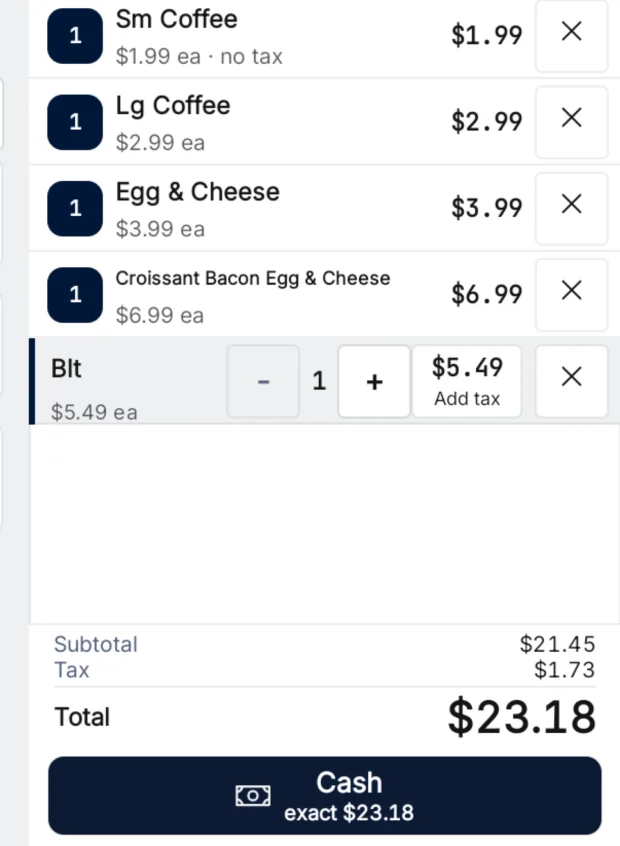
Ring up the sale. Cash or card, on the register.
Close the shift and save the cash count.
Open Admin on your phone or laptop. Sales, cash and card are there.
Screens from the Deliiq register, Admin in a browser, and the free tracker on a phone.
Built for the jobs at a deli counter.
App payments, Smart Lookup, lotto, the safe, the drawer and the close.
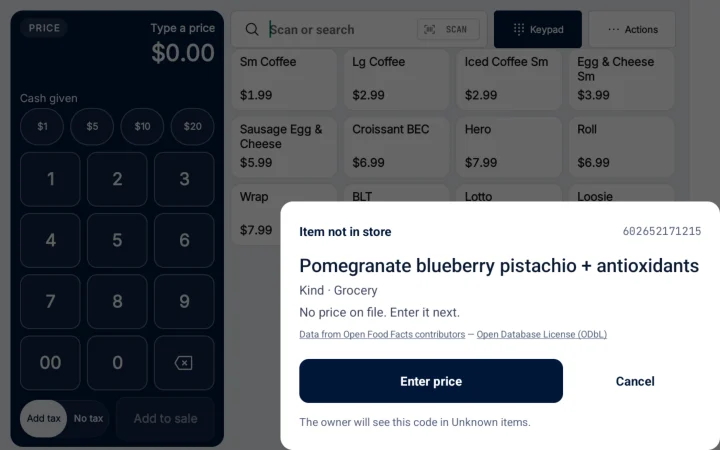
Smart Lookup for barcodes you do not have yet. Scan it. The register can look up the product name online.
When a scan has no match in your store, the register can look up the product name online. You choose the price, and required age checks still apply.
Hold a sale. Serve the next customer. Reopen it on this register when they come back.
Put a ticket on hold with a note, ring up the next person, then reopen the held ticket on this register.
Your shifts and your stock, in Admin. See past shifts and what is running low.
Open Admin on your phone or laptop. Past shifts show the opening cash, the closing count and whether it added up. Stock shows what is low and what to reorder.
Example register screen. When a scan has no match in your store, the register can look up the product name online. You choose the price, and required age checks still apply.
Each line is something the register or Admin does now.
At the counter (9)
Safe drops and payouts Record safe drops and cash payouts against the open shift. Each one keeps who made it.
Price Check Check a price without adding the item to the sale.
Age checks Age-checked items ask the cashier to enter a birth date.
Price and discount rules Change a line price or discount under your store's approval rules.
Short codes Ring stored short codes and SKUs.
Customer display An attached customer display shows the items and the total.
Switch cashiers Lock the register and let the next cashier sign in on the same shift.
Take Cash App, Venmo and Zelle at the counter. Cash App and Venmo open with the amount filled in. Zelle shows your store's Zelle details. The cashier checks the payment came in, then finishes the sale. Staff turn it on for your store. A Deliiq fee applies. Admin shows the rate.
Lotto payouts, tied to the shift. Ring lotto sales from a lotto tile. Record each winner payout against the shift and the cashier. Recorded one by mistake? Record the reversal.
Close the day (6)
Opening cash Open each shift with a counted starting cash.
Shift report Save and share this register's final shift report.
Unclear card payments A card payment with an unclear result stays on hold for review.
Waiting uploads Managers can check uploads still waiting on the register and ask it to send them.
Cash-only shifts You can run a shift cash only when card payments are not available.
Count the drawer before you see the number. At close, the cashier counts the drawer first. The register saves that count, then shows expected cash and the difference for this shift.
In Admin (9)
Stock counts Count stock and save the changes you checked.
Sales by cashier See completed sales by cashier.
Who you owe See recorded balances with suppliers and workers, and record settlements.
Register check-ins See when each register last checked in.
Manager overrides Review recorded manager overrides.
Supplier drafts Turn the reorder amounts you checked into supplier drafts.
Receiving Record what arrived, what was damaged and what is on backorder.
Supplier timing Review supplier delivery timing and recorded shortages.
Accountant packet Download records for your accountant, with missing data disclosed.
Real hardware. Our team sets it up with your card processor.
A separate purchase. It needs the software.
14-inch counter terminal. The Android touchscreen where you ring sales.
Cash drawer. Opens when you take cash.
Barcode scanner. Scan packaged items at the counter.
Card PIN pad. Where the customer pays by card.
Customer display. Shows the customer their items and total.
Our team checks your hardware and card processor before installation. Card payments need approved compatible hardware and processor support. They also need merchant approval and required certification.
The cost, the hardware, card processing, setup time and cancelling.
What does the register cost?
Software starts at $119 a month. Hardware is a separate purchase and needs the software. Card processing is quoted separately.
How does hardware delivery work?
Submit an installation request from the POS builder. Staff will confirm availability, delivery and timing before you commit.
Are card processing fees included?
Card processing is separate from your Deliiq software plan. Fees and settlement terms come from your own processor agreement. Ask us to look over your statement, reader and setup before you switch. Ask us about card processing
How long does setup take?
Setup time depends on your hardware and card processor. We confirm the date with you before install.
Can I cancel a paid plan?
Yes. Cancel from billing settings or email us. Your paid plan stays active until the billing period ends. Cancellation & refunds
What is the free tracker?
A free phone tracker for daily sales, expenses and supplier bills. You enter the numbers; it shows sales minus expenses, bills still open and days you missed. You can use it without switching POS.